COMPLIANCE / DPP / GS1 DIGITAL LINK
Digital Product Passport Software and Platform: The Code, the Data and the Page
A digital product passport platform puts a code on every product, serves tiered data from a hosted page and checks required fields. How LabelInn does it, from the label to the registry file.
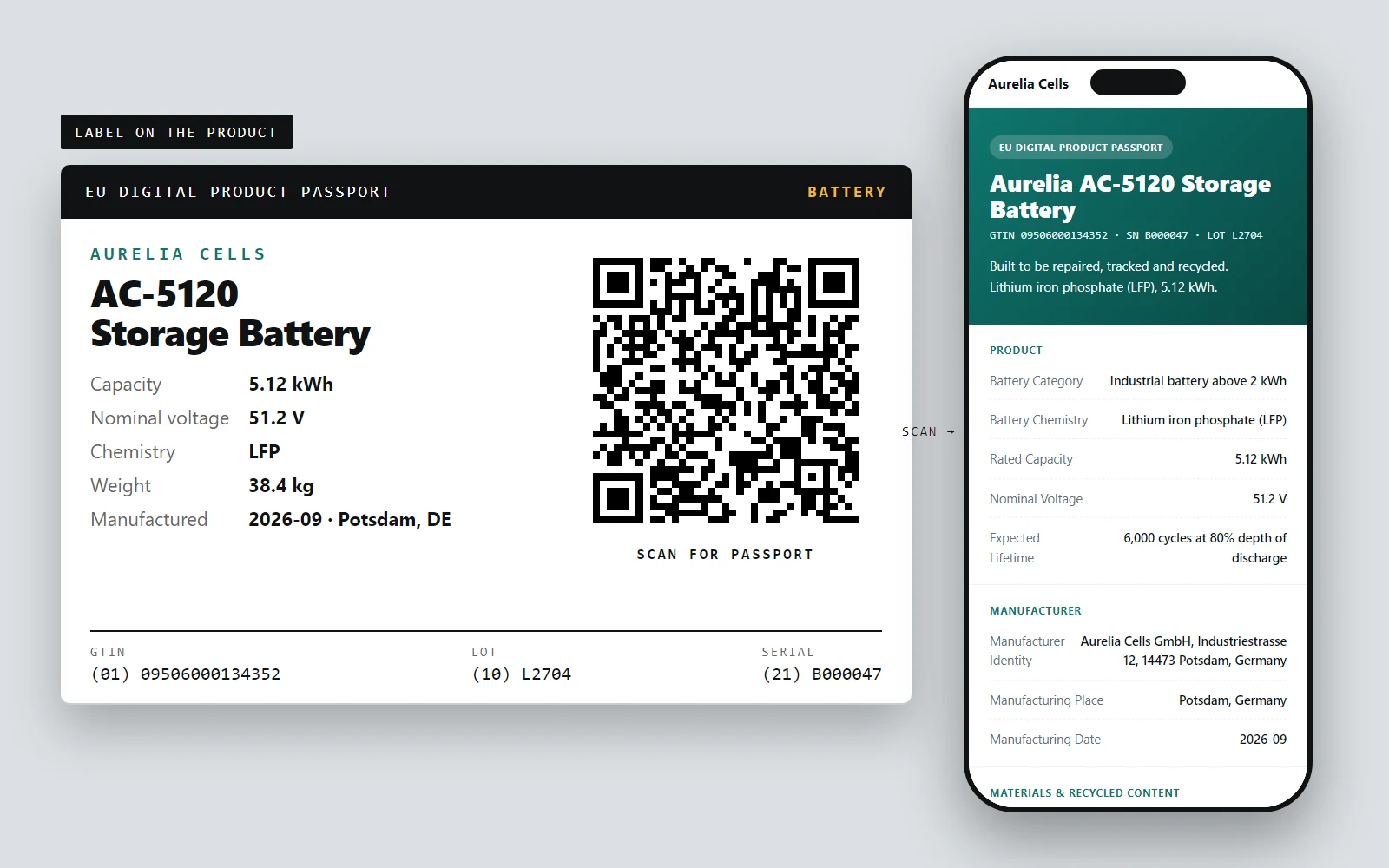
A digital product passport (DPP) is a record about one product that anyone can reach by scanning a code on it. The EU is introducing it through the Ecodesign for Sustainable Products Regulation, and batteries come first: the battery passport obligation applies from 18 February 2027 to electric vehicle batteries, light means of transport batteries and industrial batteries above 2 kWh. Other product groups follow as the Commission adopts rules for each.
Implementing details are still being finalised, so check official sources for the current state. What does not change is the shape of the job: put an identifier on every product, keep the right data behind it, and serve it to the right audience.
Just need the identifier? The free GS1 Digital Link generator builds the URL and the QR code from a GTIN, lot and serial.
THE THREE PARTS
The code, the data and the page.
What the platform does, shown on one sample battery.
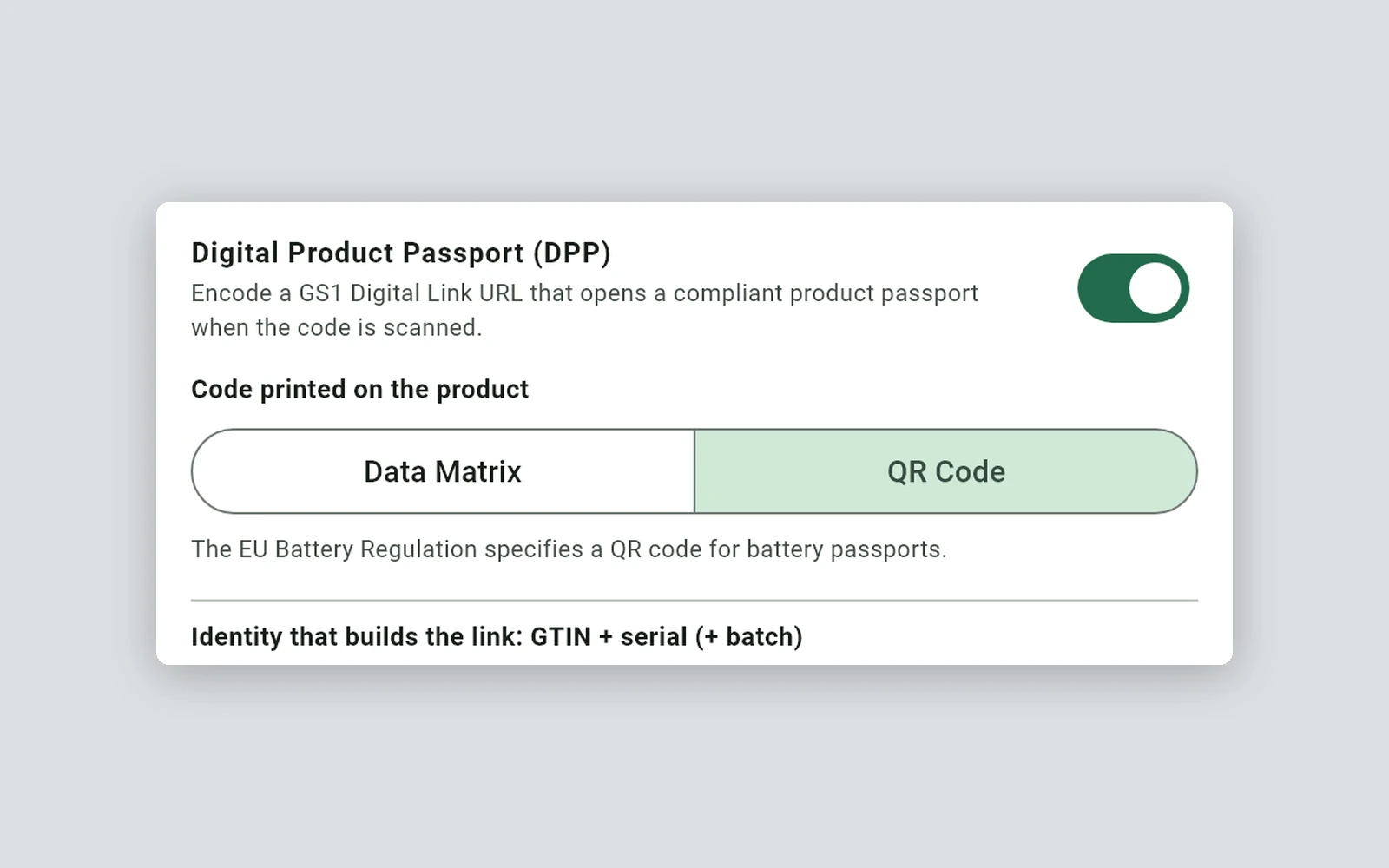
One switch, a Data Matrix or QR code carrier, and the identity rows that build each item's link.
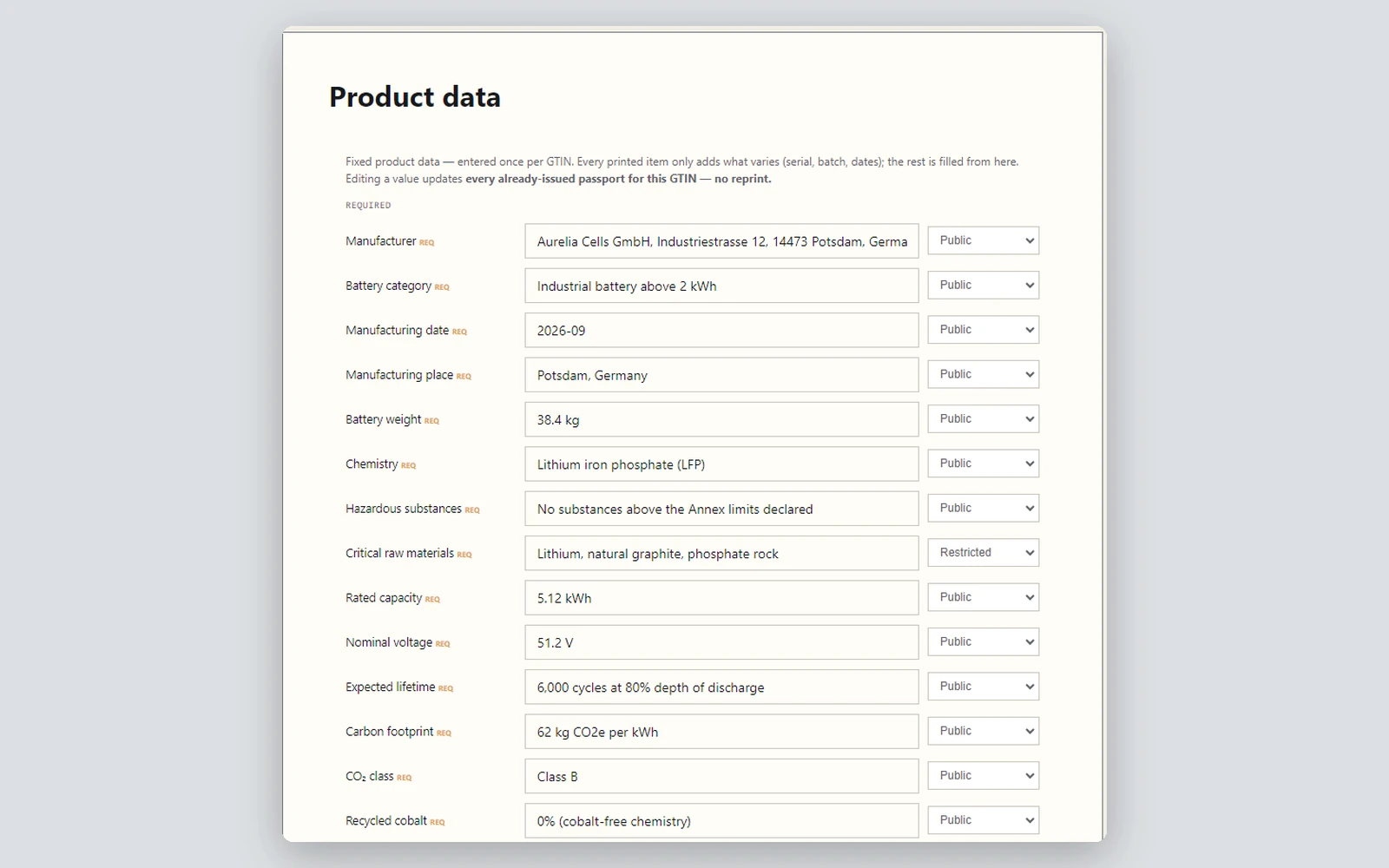
Fixed values per GTIN in the web dashboard, each with its own tier. Editing one updates every issued passport.
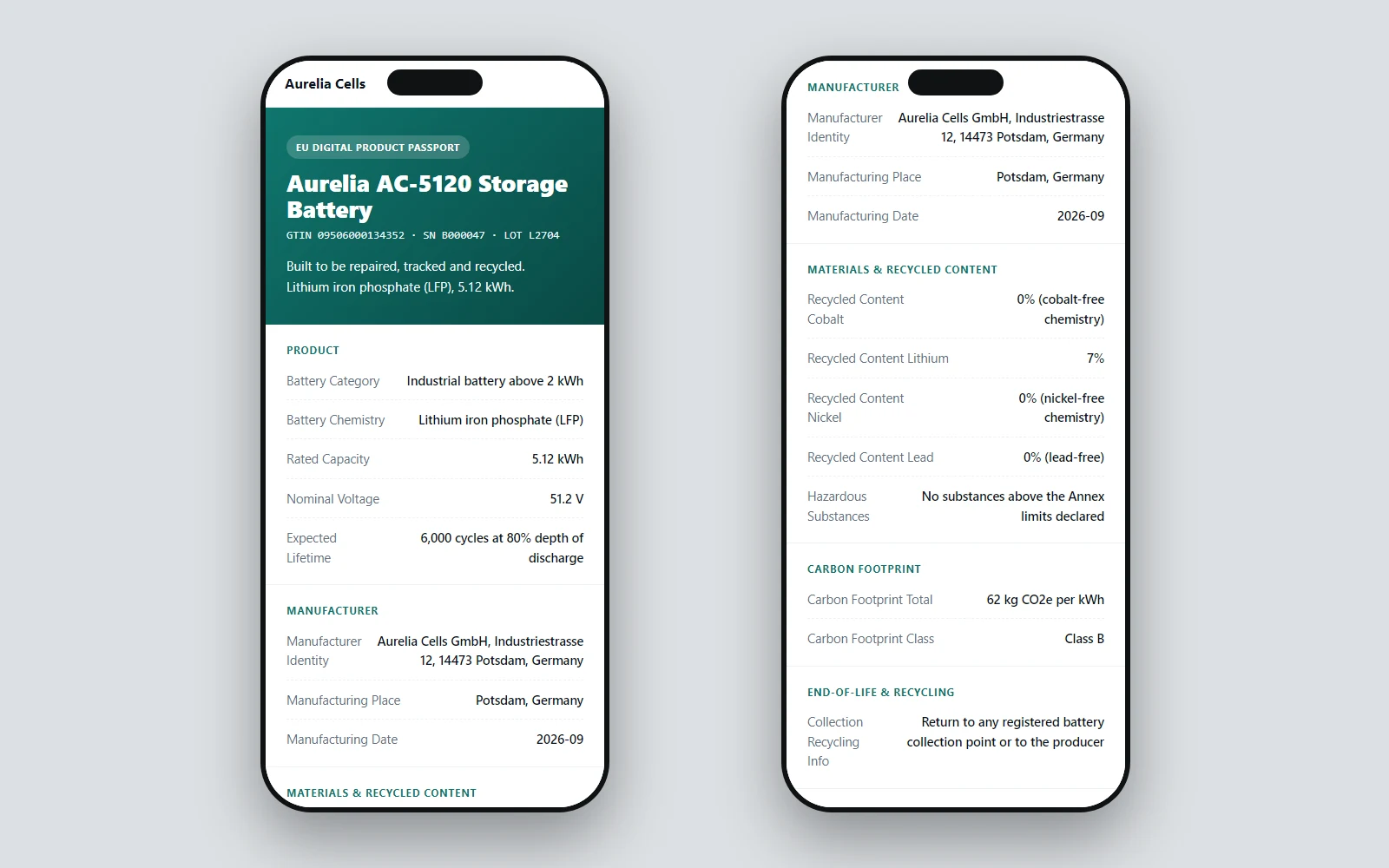
A hosted page for people and JSON-LD for software, from the same address.
01 / DIGITAL PRODUCT PASSPORT
The three parts of a passport
| Part | What it is | How LabelInn handles it |
|---|---|---|
| The code on the product | A 2D code carrying a GS1 Digital Link: the GTIN, plus batch and serial for item-level passports | A GS1 barcode element with a passport switch. It encodes the Digital Link URL as a QR code or a Data Matrix, and adds a per-item serial automatically, so every printed item has its own address |
| The data | Product facts, split by who may see them | Fields carry an access tier: public, restricted or private. Fields that are known to be restricted are kept out of the public tier on the server |
| The page | What a scan opens | A hosted passport page for shoppers, and a machine-readable JSON-LD version for authorities, from the same address |
02 / DPP
What happens when you print
- You design the label with a GS1 barcode, turn on the passport option, choose a category such as battery and pick the carrier, QR code or Data Matrix.
- You bind each passport field to a value, from Excel, CSV, an API or typed in, like any other label field.
- When the labels print, LabelInn registers one passport per static product or per item. Registration runs alongside printing and never blocks or changes the print.
- A scan resolves to the passport page. Edit the product's fixed data once in the dashboard and issued passports show it without reprinting.
03 / BATTERY PASSPORT
Who sets what: designer, product owner, operator
A passport touches different people in a company. LabelInn keeps their work in different places, so the person who prints labels does not have to own the compliance data, and the person who owns it does not have to open a label designer.
| Who | Where | What they set |
|---|---|---|
| Label designer (Editor role) | Label designer in the LabelInn app | The barcode: passport switch, QR code or Data Matrix, and the identity rows (GTIN, lot) with the source of each value: a fixed value, an Excel or CSV column, a database query, an API or a counter. A design can be set to need approval before anyone prints it |
| Product or compliance owner | Passport Studio in the web dashboard | Per GTIN: the fixed product data, once, with a public, restricted or private tier on every field. The page itself: brand, colours, typeface, product photo, sections and copy, or a layout drafted by AI from a short brief. Editing a value updates every passport already issued for that GTIN, with no reprint |
| Operator (Print-only role) | Print dialog in the app | Chooses the data rows and the number of copies and prints. The serial is added automatically |
| Your own systems | REST API | Register passports and read them back as JSON-LD from an ERP, a MES or a battery management system |
Three levels of data meet on one passport. The product level is fixed once in Passport Studio. The lot level (manufacturing date, place, lot number) is bound on the label and comes from your data at print time. The item level is the serial number, added by LabelInn for every label.
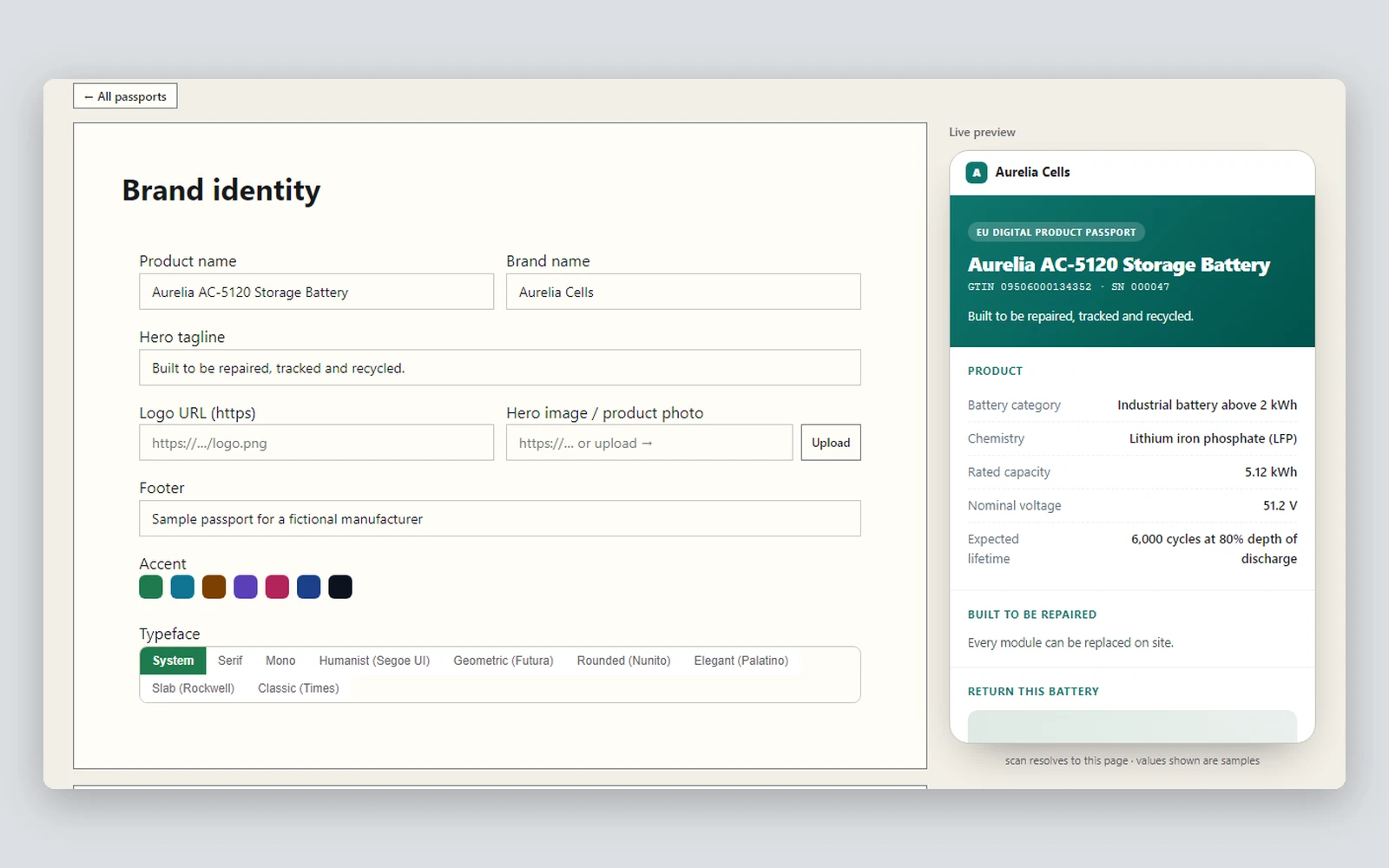
Brand, colours, photo and tagline on the left, a live phone preview on the right. Required EU fields are always shown.
Fixed values entered once per GTIN. Each field carries a tier, and fields the regulation restricts start as restricted.
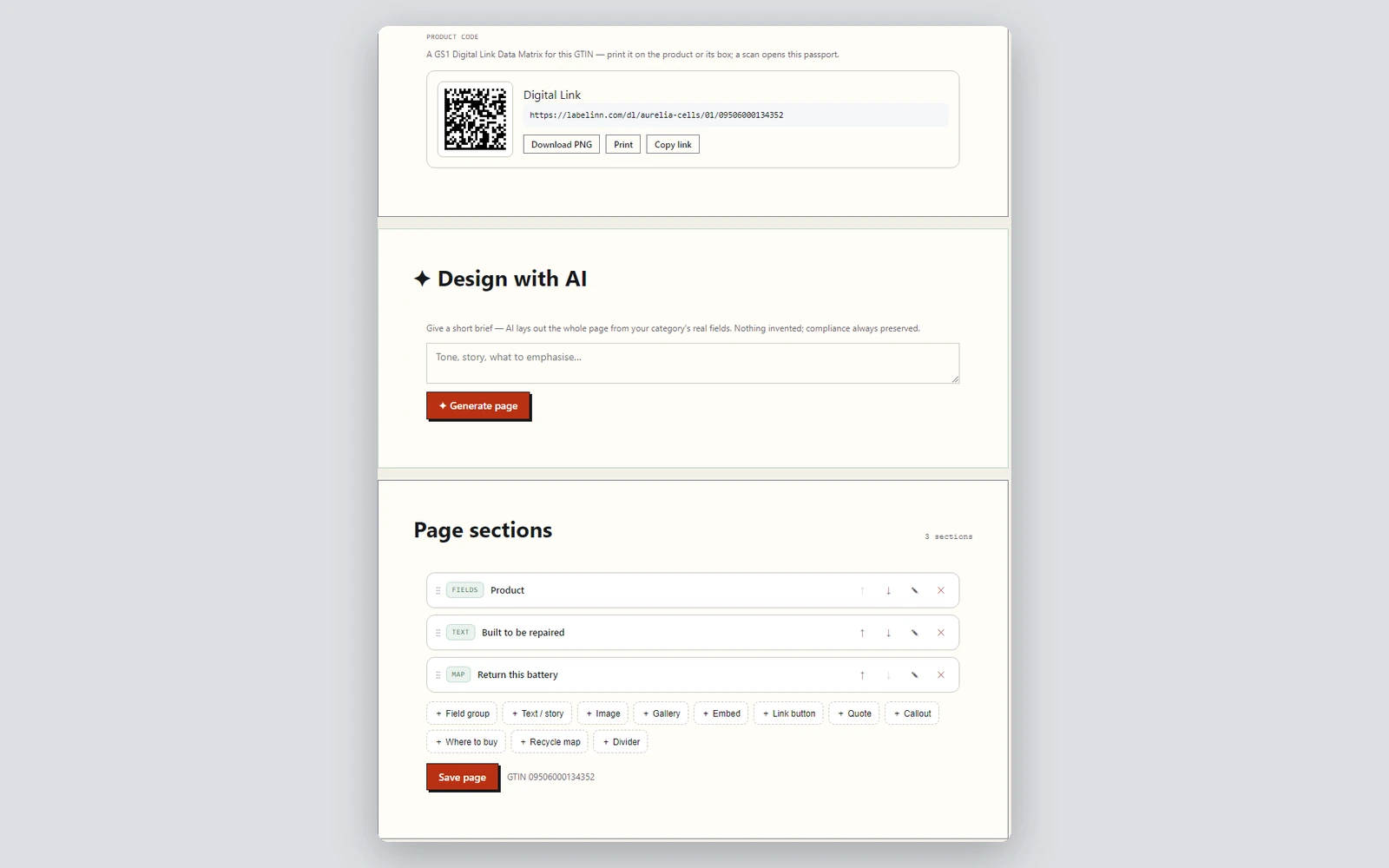
A Data Matrix of the product link to download, an AI layout from a short brief, and eleven section types to reorder.
04 / GS1 DIGITAL LINK
A checklist for the required fields
For each category LabelInn keeps a list of required fields. The battery list covers 20 fields, such as manufacturer, battery category and chemistry, rated capacity, carbon footprint, recycled content, due diligence and dismantling information, and follows our reading of Annex XIII of Regulation (EU) 2023/1542. Textile and packaging lists exist as well (the textile list is marked as a draft), plus a general list for products without their own rules yet.
Every registered passport is marked complete, incomplete with the missing fields, or unregulated. This is a completeness check, not a legal opinion, and it is deliberately soft: an incomplete passport still prints.
05 / DIGITAL PRODUCT PASSPORT
Design the page, use the API
- Passport Studio in the web dashboard: your brand, product photos and ordered sections. Fields you do not place are still shown, so a custom design cannot hide required data.
- REST API and MCP tools to register passports, design the page and read it from your own systems, with the same results as the app. See the label printing API.
06 / DPP
Where LabelInn fits among DPP tools
Passport tools come in a few kinds. Pure passport platforms collect the data and host the page, and typically leave the physical label to you. Large label and packaging suppliers sell data and label together, usually as a consulting project with a price on request. Supply-chain data networks connect many companies, which is what some battery and automotive programmes need.
LabelInn is built around the label line: the code on every product, the hosted page, required-field checks, versioned publishing and the print itself, in one self-serve platform for companies that print their own labels. When your programme also runs a data network between suppliers, LabelInn takes that data in through the API and puts it on the passport.
07 / BATTERY PASSPORT
What the platform covers
- Passport profiles with versioned publishing. Draft, publish, history and restore for every product, each change recorded in the audit trail, with a readiness check that names what is still missing.
- Four-eyes approval. Optionally, a second person approves a change before it goes live, notified by email and in their inbox.
- A document vault. Declarations of conformity and test reports as PDF, fingerprinted on our server, with validity dates and expiry events.
- Every field from where it lives. Fixed once in Studio, read at print from an Excel, CSV, Google Sheets or database column, or sent by your systems. Printing stations report which sources and columns they can read, so a broken source shows up before the labels do.
- Live data after the sale. State of health, charge cycles and status through the API, validated, newest measurement first, up to 500 passports per call.
- A serial ledger. Every serial printed per product, items printed twice flagged, withdrawal and recall in bulk; a withdrawn code opens a page that says so.
- Access keys. Restricted data opens for the recyclers, repairers and authorities you choose, and every access is logged.
- A scan page in six languages (English, Turkish, German, French, Spanish, Italian), with JSON-LD that carries the version and a content fingerprint.
- Your own address. Passports can live under your domain, such as dpp.yourbrand.com, and every link carries your permanent publisher name.
- Full export. Profiles, versions, every passport and the documents in one archive with a SHA-256 manifest, and a registry file ready for the EU registry.
- Events and webhooks when a passport changes, is withdrawn or a document is about to expire, and the same events can start a workflow.

08 / GS1 DIGITAL LINK
See it working
Every picture below is the real page or the real screen, rendered from LabelInn's own code with a sample product.
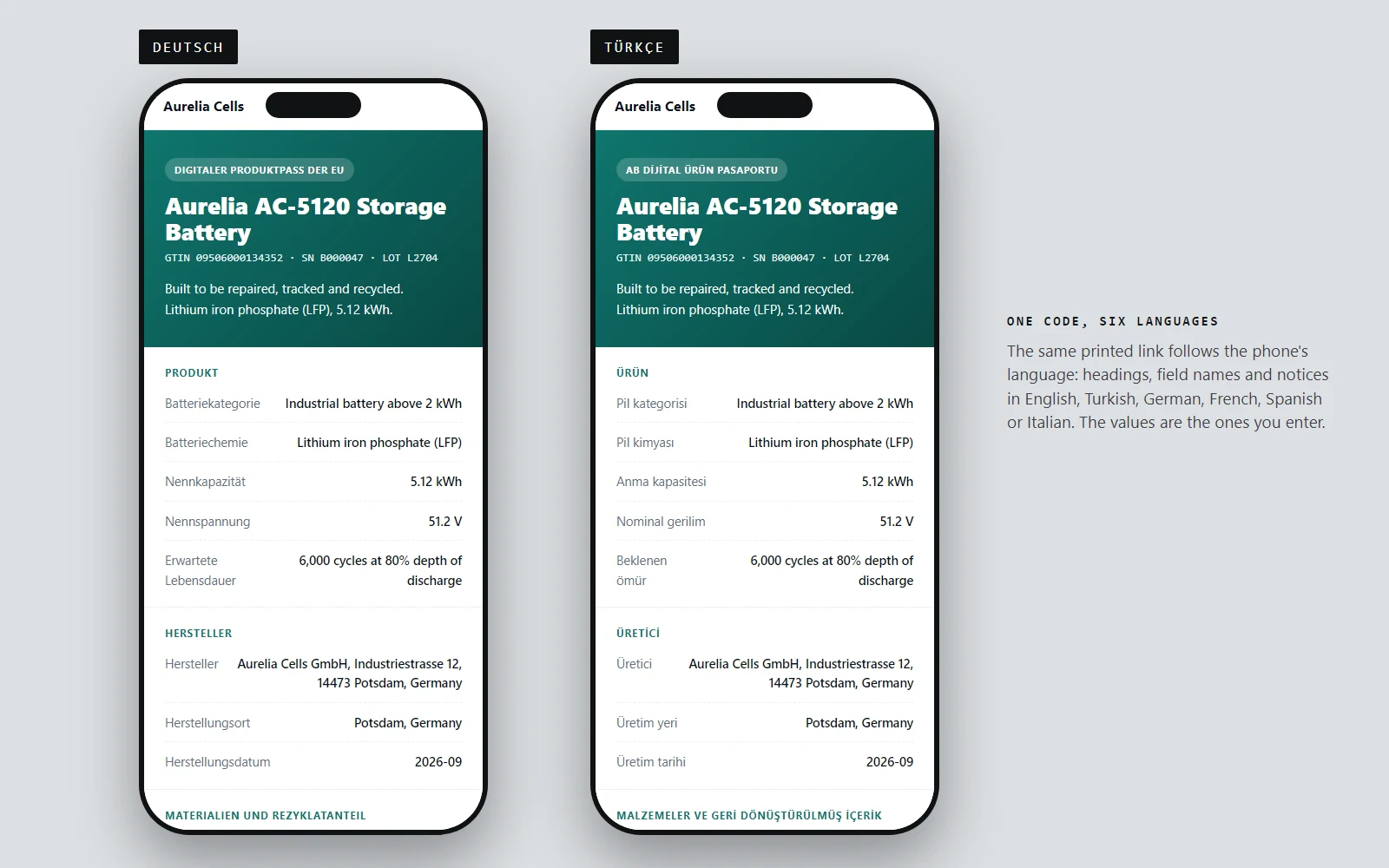
Headings, field names and notices follow the phone: English, Turkish, German, French, Spanish or Italian.
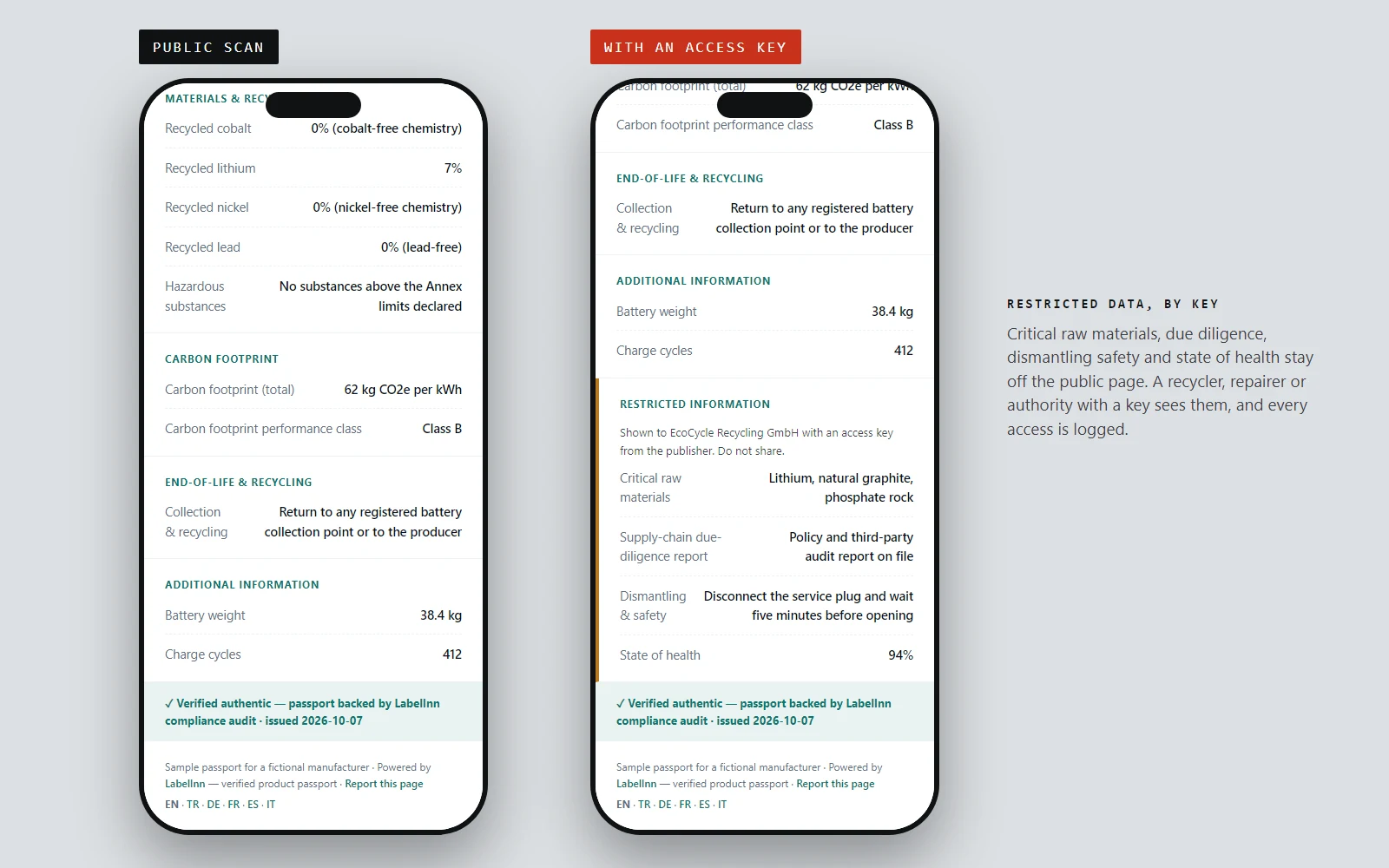
The public sees the public tier. A recycler with a key also sees raw materials, due diligence, dismantling and state of health.
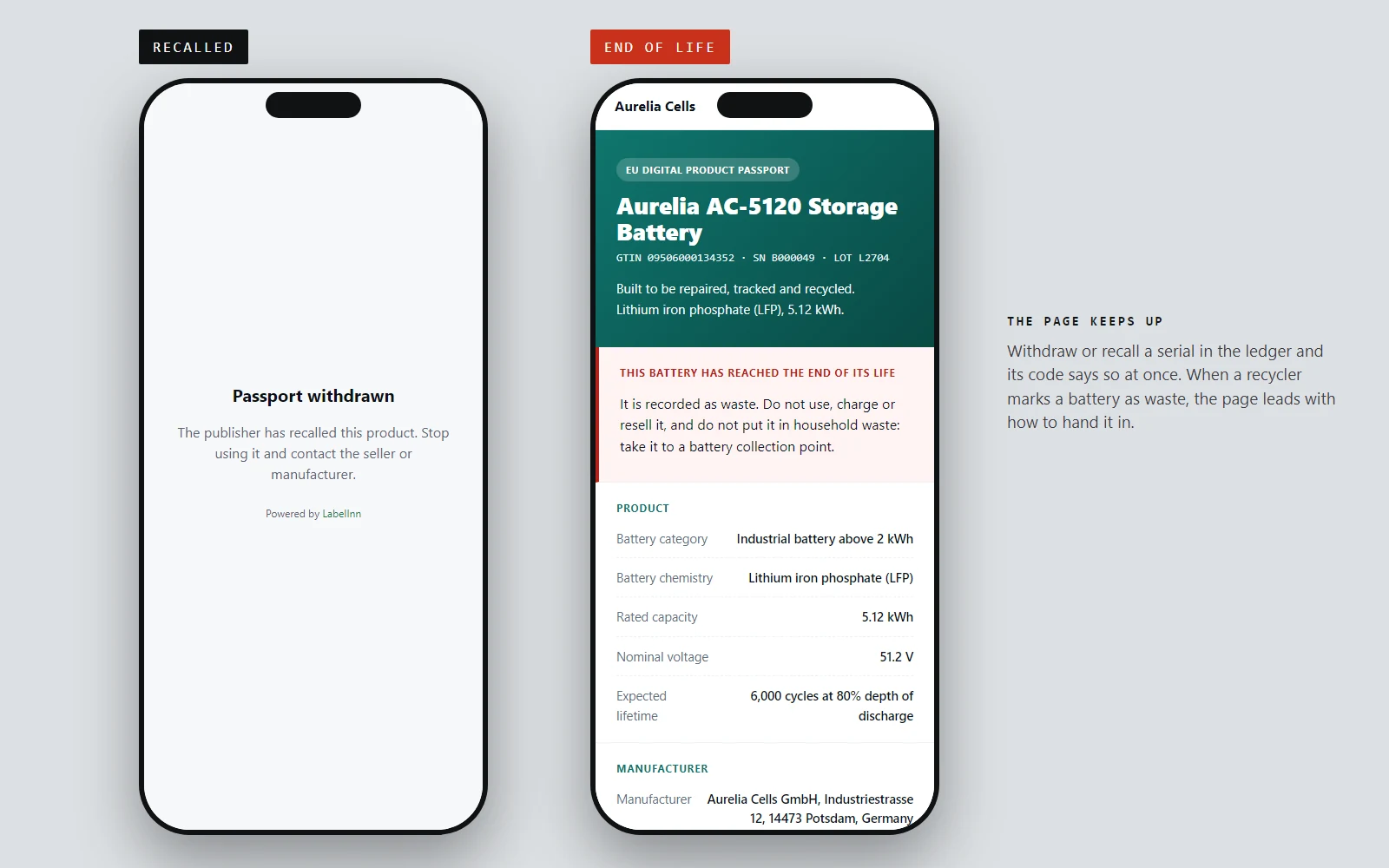
Recall a serial and its code says so. Mark a battery as waste and the page leads with how to hand it in.
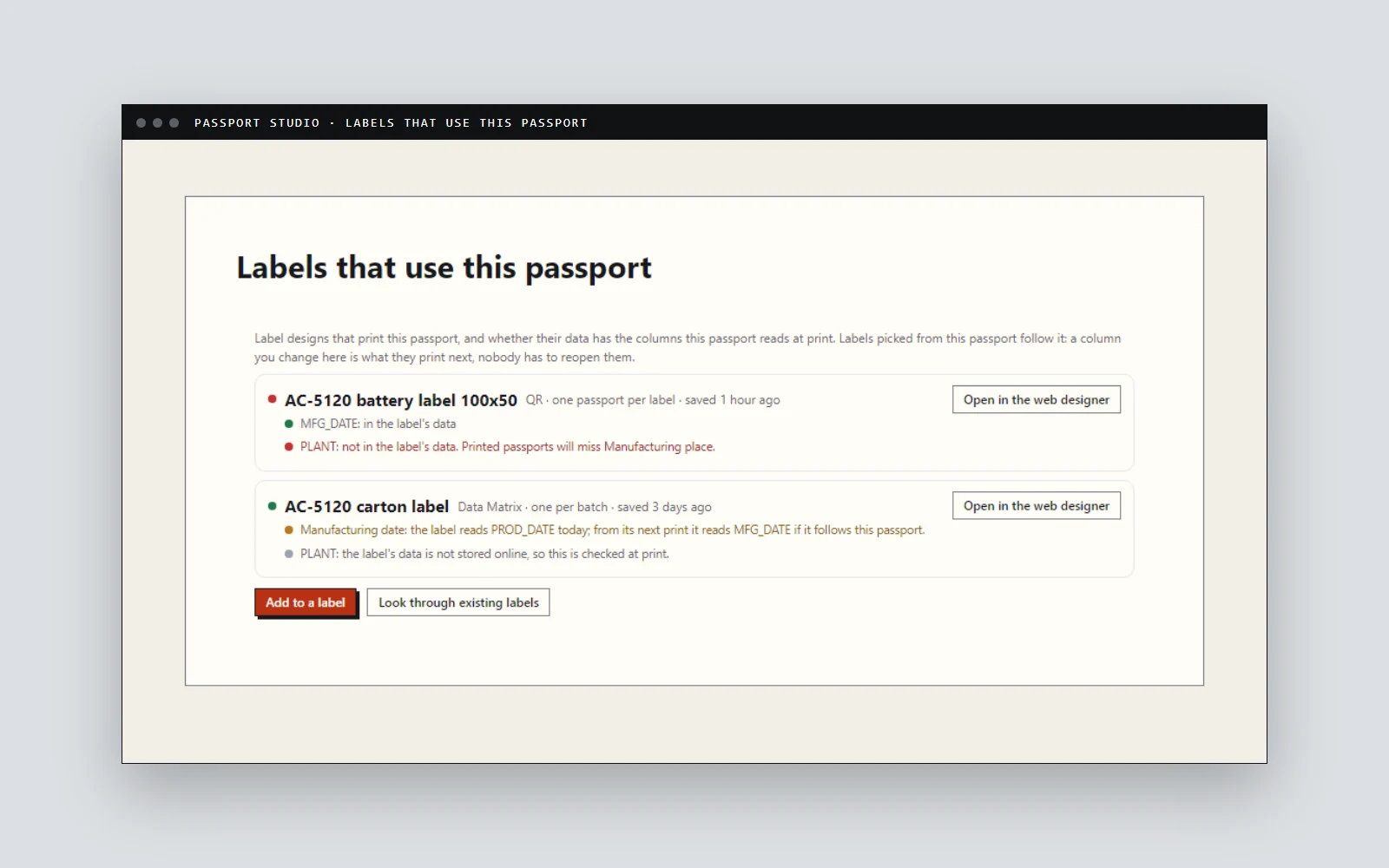
Every label design that prints it, and whether its data has the columns the passport reads at print.
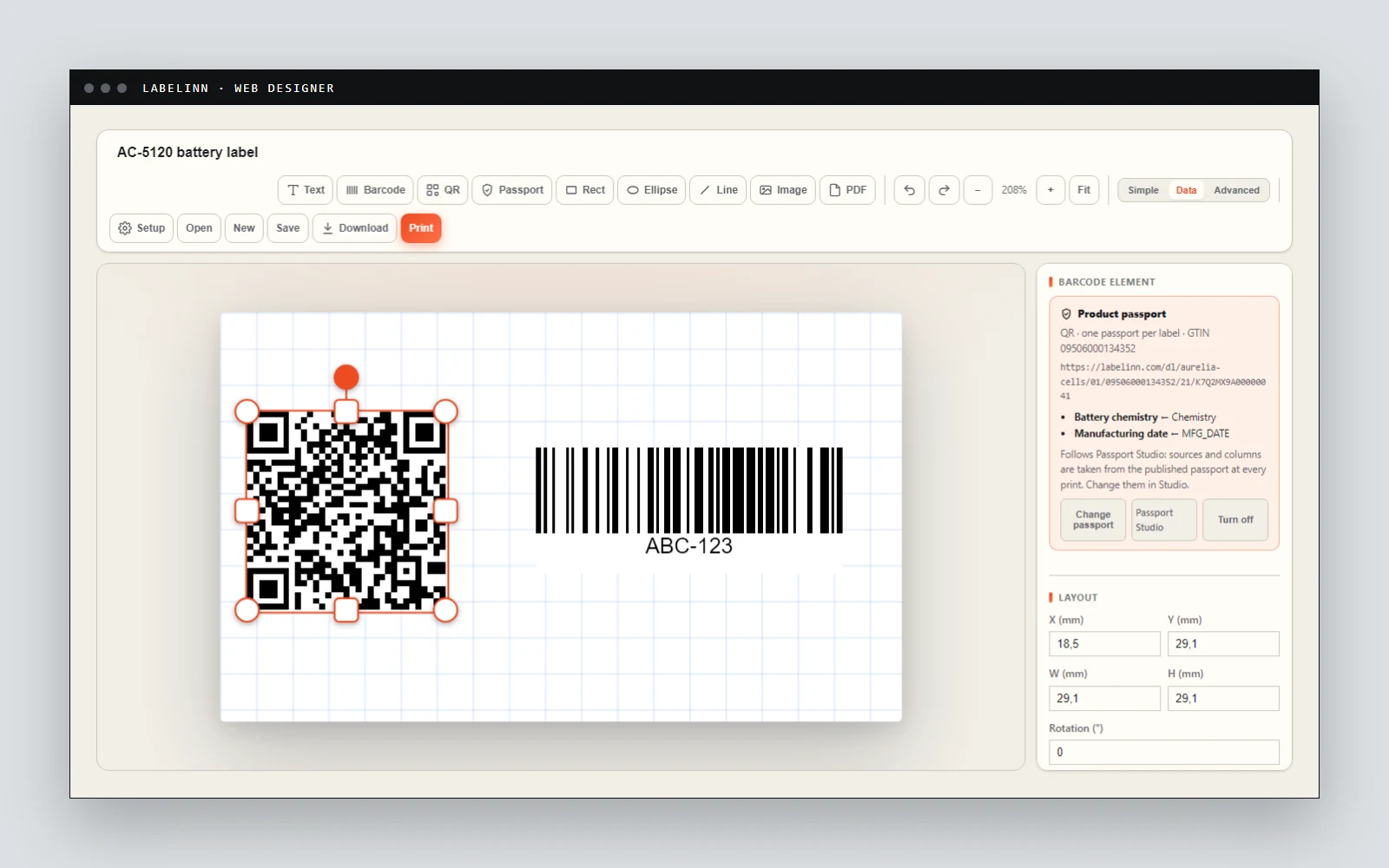
In the browser: the code is drawn as the real Digital Link, and the label follows Passport Studio at every print.
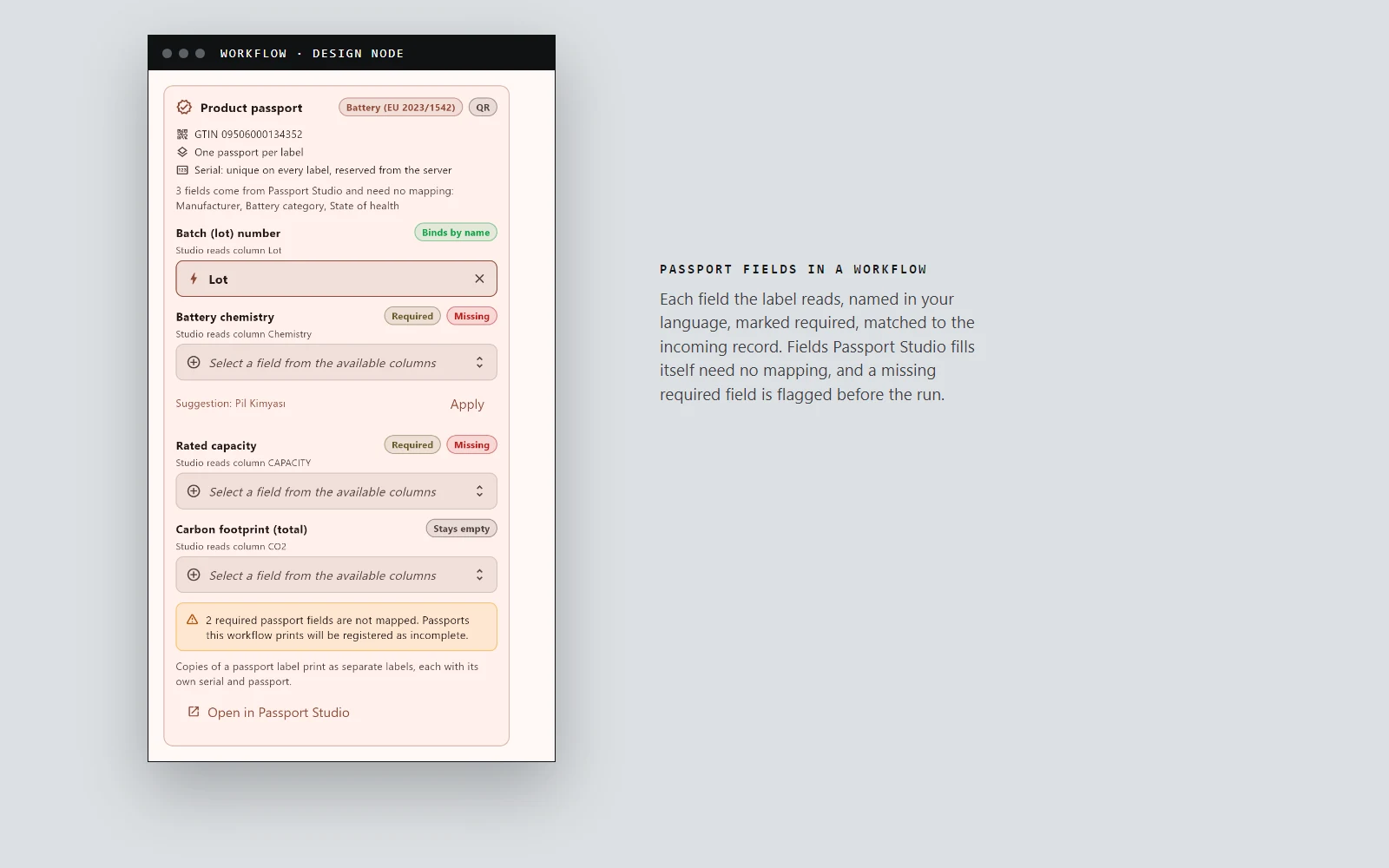
Each field named in your language, required ones flagged, likely matches suggested before the run.
09 / DIGITAL PRODUCT PASSPORT
Outside the EU passport
The label line that prints passports usually ships to other markets too, and they have their own traceability rules. They are not passports, but they ask the same of the label: the right identifier, encoded exactly, on every item, with a record of what was printed.
- United States, prescription drugs (DSCSA). A GS1 DataMatrix with GTIN, serial, lot and expiry on every package. See DSCSA label printing.
- United States, food (FSMA 204). A traceability lot code that travels with every case. See FSMA 204 traceability lot code labels.
- Russia (Chestny ZNAK). Codes issued by CRPT that must be printed exactly as issued. Check a code file with the free Chestny ZNAK code checker.
10 / DPP
What stays with you
- The content is yours. LabelInn checks every passport against the required fields of its category and shows what is missing; what the passport says is your responsibility under the regulation.
- The EU registry entry is filed by your organisation. The Commission's registry (live since 20 July 2026) keeps each passport's identifier and where it is hosted; the data stays with you or a provider you designate. Entries are filed under your organisation's verified identity, signed by its legal representative. LabelInn prepares the registry file for every passport and hosts the passports the entries point to.
- GTINs come from GS1 in your country. LabelInn builds every link and code on them.
ANY PRINTER
Design it, bind your data, print on the printer you already own.
Zebra, TSC, Toshiba, Epson and more — over USB, network or Bluetooth, with no driver to install.
PRICING
Start free. Pay when it earns its keep.
QUESTIONS / FAQ
Frequently asked questions
What is a digital product passport?
A record about one product, reachable by scanning a code on it. The EU is introducing it through the Ecodesign for Sustainable Products Regulation, starting with batteries.
When does the battery passport apply?
From 18 February 2027 for electric vehicle batteries, light means of transport batteries and industrial batteries above 2 kWh. Implementing rules are still being finalised, so check official sources for the current state.
Does LabelInn make me compliant?
Compliance stays with the operator under the regulation. LabelInn does the work around it: it registers a passport for every printed item, hosts the page, keeps restricted data behind access keys, versions and audits every change and flags missing required fields.
Can LabelInn print the passport code as a QR code?
Yes. The passport option can carry the Digital Link as a QR code or a Data Matrix. The Commission says the battery passport is linked to the battery through a QR code. The free generator also builds a QR code from any Digital Link.
Is LabelInn a digital product passport platform?
Yes, built around the label: the code on every product, tiered data, a passport page and JSON-LD from one address, required-field checks, versioned publishing with approval, a serial ledger, access keys, live data through the API and a registry-ready export.
Does it connect to the EU digital product passport registry?
It prepares the filing. The Commission's registry went live on 20 July 2026 and stores each passport's identifier and hosting address; verified economic operators file there, signed by their legal representative. LabelInn exports a registry file with every passport's identifier, level, commodity code, EORI and data address, ready for your organisation to submit.
KEEP GOING
Related
BUILDING A PASSPORT?
Tell us your product and your deadline.
Each product group has its own rules, and the first steps differ for a battery maker and a clothing brand. Send us your product group, how many items you label a year and where your product data lives today. A person replies within 24 hours with how LabelInn sets it up for your product.